Turn every form submission into the next action
AbcSubmit connects forms, approvals, notifications, tasks, documents, data and integrations in one visual workflow—so requests move forward without spreadsheet handoffs or constant email chasing.
No-code workflow automation · Cloud and on-premises options · Updated September 2026

What is form automation software?
Form automation software decides what should happen after someone submits information. Instead of sending every entry to the same inbox, it can evaluate answers, notify the right person, request approval, assign a task, update a database-style collection, generate a document or send data to another system.
The form becomes the starting point of a repeatable business process. A purchase request can go to the appropriate manager. An accepted application can create onboarding tasks. A high-priority incident can alert a response team immediately. Each path follows rules your organization defines.
From submission to completed process
Capture
Collect complete, structured information with validation and conditional questions.
Evaluate
Use form answers, thresholds or request types to select the appropriate path.
Act
Notify, assign, approve, request edits, generate documents or call an integration.
Track
See current status, workflow history and outcomes without searching through email chains.
Automate a purchase request without losing control
An employee completes a request with the vendor, cost center, items and business justification. A conditional rule checks the amount. Routine purchases can follow a short path; higher-value requests can add finance or executive review.
Request submitted
Required details and supporting files arrive together.
Approval path
Rules select manager, finance or executive reviewers.
Outcome recorded
The requester is notified and the decision remains traceable.
Start from the purchase-order and budget approval templates, then adapt reviewers, thresholds and notifications.
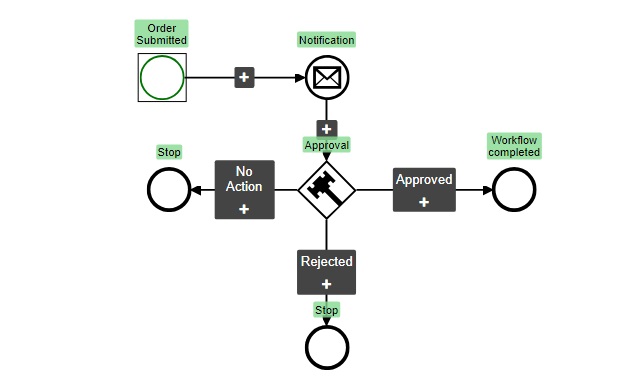
What can AbcSubmit automate?
Conditional routing
Branch the workflow according to amount, category, risk, department or another submitted value.
Approvals
Send requests to one or several reviewers and record approved, rejected or expired outcomes.
Notifications
Keep requesters, reviewers and operational teams informed at the moments that matter.
Request edits
Return incomplete or inaccurate information for correction instead of restarting the process.
Assignments and tasks
Move approved work to the person responsible for the next operational step.
Timers and deadlines
Model time-sensitive steps and prevent important requests from sitting unnoticed.
Dynamic forms
Collect additional information later in the workflow when the next participant needs to contribute.
HTTP requests and integrations
Pass data to connected systems or trigger integration actions where supported.
BigData updates
Keep structured operational records connected to the process instead of isolated in attachments.
Node types and limits differ by plan. Review the current AbcSubmit pricing and feature matrix before designing a production workflow.

Build the form around the decision
A workflow cannot repair unclear intake. Start by asking what the next person needs to decide or act confidently. Then design the form to collect that information once.
- Use precise labels instead of internal jargon.
- Group questions by topic and responsibility.
- Use conditional logic to remove irrelevant fields.
- Validate dates, email addresses, quantities and required documents.
- Capture a clear requester, owner and business purpose.
- Explain what happens after submission.
Browse form templates or learn how operational forms support growing businesses.
Seven form workflows worth automating
| Process | Useful automation | Business outcome |
|---|---|---|
| Purchase requests | Route by amount and department; add finance approval when needed. | Consistent spending control and fewer incomplete requests. |
| Employee onboarding | Collect documents, approvals and follow-up forms in a defined sequence. | A repeatable start for every employee. |
| Access requests | Add security review for privileged systems and record approval comments. | Clear ownership and auditable access decisions. |
| Lead qualification | Notify the right salesperson according to region, product or urgency. | Faster response without manual forwarding. |
| Incident reporting | Escalate serious events while routing routine cases to the normal queue. | Prioritized response and better documentation. |
| Design approvals | Collect files, route stakeholder reviews and request revisions. | Less feedback scattered across channels. |
| Appointment requests | Review availability, notify the client and continue to a calendar step. | A clearer path from request to confirmed booking. |
See a fuller explanation of multi-step approval workflows.
Generate PDFs without retyping submission data
Some processes end with a document: an application summary, invoice, service report, approval record or signed acknowledgement. Use the submitted values to produce a consistent PDF instead of copying information by hand.
Keep the structured record for searching and automation, while using the PDF for distribution, printing or archiving. Learn how to create fillable PDF forms and design PDF output from form submissions.

How to automate a form process safely
Map the current work
List every participant, decision, delay, exception and system involved today.
Choose one outcome
Define what “complete” means and which metrics will show improvement.
Build and test
Exercise normal, rejected, overdue and incomplete paths with realistic data.
Launch and improve
Train owners, monitor bottlenecks and revise rules when the process changes.
Cloud form automation or on-premises?
Cloud
Suitable when teams want faster setup, managed infrastructure and access from distributed locations. Compare forms, submissions, storage, notifications, users, workflow nodes and integrations by plan.
On-premises
Designed for organizations that need additional infrastructure control. AbcSubmit advertises unlimited users, forms, results and storage, full workflows, custom databases, LDAP/Active Directory provisioning, and Windows or Linux support for its on-premises offering.
Ask before deciding
Evaluate security responsibilities, backups, updates, availability, identity management, custom development, support and total operational cost—not only subscription price.
See the dedicated on-premises form builder overview.

What to compare before choosing software
- Can nontechnical owners change forms and workflow rules?
- Are approvals, timers and request-edit paths supported?
- Can data be stored, exported and deleted appropriately?
- Which integrations are native, indirect or API-based?
- How are roles, permissions and authentication managed?
- Can the workflow produce the reports and documents you need?
- What happens when volume, users or storage grows?
- Is cloud or on-premises deployment required?
- How will failures and overdue work be detected?
Form automation metrics that reveal real improvement
Cycle time
How long does a request take from submission to final outcome?
Waiting time
Where does work remain idle, and which approval step causes the delay?
Rework rate
How often is a submission returned because required information is missing?
Completion rate
Do people finish the form, or abandon it at a particular section?
Exception rate
How often does the standard path fail to fit the request?
Manual touches
How many times must someone copy, forward or re-enter the same information?
Form automation software FAQ
What does form automation software do?
It collects structured information and automatically starts follow-up actions such as notifications, conditional routing, approvals, assignments, document generation, database updates or integrations.
What is the difference between a form and a workflow?
The form captures information. The workflow defines what happens next, who is responsible, which decisions are required and how the process ends.
Can AbcSubmit automate multi-step approvals?
Yes. Its published feature matrix lists approval, conditional branch, timer, request-edit, dynamic-form, assignment and other workflow nodes. Availability and limits depend on the selected plan.
Can automated forms accept payments?
AbcSubmit lists payment fields and processors including PayPal, Stripe Checkout, Square, Braintree and others. Payment availability and the appropriate workflow depend on the plan and processor configuration.
Can forms work offline?
AbcSubmit advertises offline forms and a mobile forms app. Test the required fields, devices and synchronization process before production use.
Can I connect form submissions to other applications?
The current matrix lists integrations such as Google Sheets, Mailchimp, Slack, Zapier, Google Calendar, Google Drive, Dropbox, Trello, Jira, HubSpot CRM, ActiveCampaign, Zendesk and webhooks, with availability varying by plan.
Is there a free plan?
Yes. The current free plan lists three forms, up to 20 fields per form, ten conditional rules per form and 100 monthly submissions, among other limits. Because pricing changes, verify the live pricing page.
How should I start?
Choose one stable, repetitive process with a clear owner and measurable delay. Build the simplest useful workflow, test every outcome, then expand after the team trusts it.
Feature and pricing notes
This guide was reviewed against AbcSubmit’s public plans, workflow-node list, integrations and deployment information available in September 2026. Plan limits and product capabilities can change.
References: AbcSubmit pricing and feature matrix and AbcSubmit workflow templates.
Stop routing requests by hand
Start with a proven workflow template or build a process around the way your team actually makes decisions.