Turn form submissions into searchable database tables
Collect structured data with online forms, map selected fields into reusable AbcSubmit BigData Collections, and connect each record to exports, newsletters or automated workflows.

What is a form database collection?
A form database collection stores selected submission values as structured rows and columns. Instead of treating every response as an isolated message, your team can organize customer, product, request, inventory or reference records in a consistent table.
Collect
Use forms to capture validated values from customers, employees or field teams.
Organize
Map answers into named columns so records remain consistent and easier to reuse.
Act
Export records, reference collection values or continue the submission through an automated workflow.
Form submissions versus a database table
| Use regular submissions when… | Use a collection table when… |
|---|---|
| Each response is a separate request, application or survey answer. | The record should be referenced, updated or reused by other forms and processes. |
| The submission history is the primary record. | A stable entity such as a customer, product, location or asset is the primary record. |
| You mainly review or export responses in batches. | You need a consistent column structure for lookup, mapping or downstream workflows. |
| The data does not need to drive another form. | Collection values may populate a BigData Dropdown or appear through a BigData Row Viewer. |
The two models can work together: preserve the original form submission for context while mapping approved values into the operational collection your team maintains.
How to turn form data into a useful table
Define the record
Decide what one row represents: a person, company, asset, product, location, order or another entity. Do not mix unrelated record types in one collection.
Choose stable columns
Create fields for values that need to be filtered, mapped or reused. Keep long notes separate from structured status, category and ownership fields.
Add a unique identifier
Use an account, asset, request or product ID where records may share a name. A stable key helps detect duplicates and supports future updates.
Build the collection form
Use the appropriate form fields, validation and conditional logic. Ask only for values the process needs.
Map form fields to collection columns
Verify data type, naming and choice values. Submit realistic tests, including blanks, special characters and duplicate identifiers.
Define review and update rules
Decide whether every submission creates a row or whether information must be approved, corrected or matched before it enters the collection.

Design a table people can understand
A good schema uses predictable names, controlled values and clear ownership. It is easier to search and safer to automate than a table filled with ambiguous free text.
| Column | Example | Reason |
|---|---|---|
customer_id | C-10482 | Stable identity |
company_name | Northwind Services | Readable label |
status | Active | Controlled workflow state |
owner_email | team@example.com | Responsibility |
updated_at | 2026-09-10 | Record freshness |
These are illustrative field names, not required AbcSubmit columns.
Database tables you can build from form data
Customer directory
Store approved contact, organization, segment, owner and lifecycle details collected through intake forms.
Product catalog
Manage product identifiers, descriptions, categories, pricing inputs and availability used by order forms.
Asset register
Capture equipment IDs, locations, condition, inspection dates and responsible teams.
Supplier list
Organize vendor details, service categories, documents, approval status and renewal dates.
Event or member roster
Keep consistent participant details, preferences, status and communication fields.
Reference table
Maintain departments, locations, service types or other controlled values used across forms.
Use collection data inside forms
A database-backed form can do more than write rows. AbcSubmit’s current feature matrix lists BigData Dropdown and BigData Row Viewer fields alongside BigData Collections.
Dynamic choices
Use collection-backed dropdown values for controlled options such as locations, products or departments.
Record lookup
Let an authorized workflow reference an existing row instead of asking users to re-enter the same information.
Consistent updates
Design a separate update process with identity checks and approval rules rather than editing records informally.
Import and export collection data
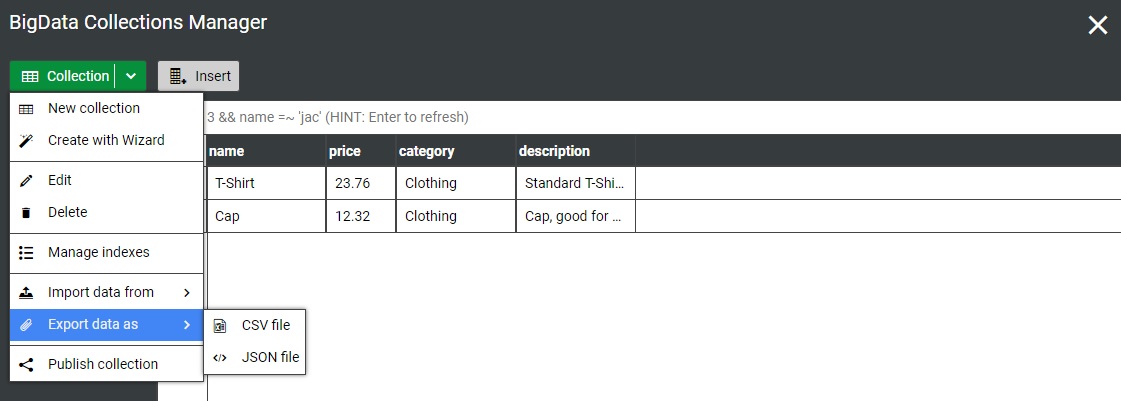
Imports help seed a collection from existing records; exports make data available for analysis, backup or another controlled process. The existing AbcSubmit collection tools support CSV or JSON export.
- Normalize dates, identifiers and choice values before import
- Remove columns that the collection does not need
- Test a small sample before a full import
- Check encoding and special characters
- Validate row counts and important totals after transfer
- Protect exported files according to their sensitivity

Add governance with workflows
Not every submitted value should immediately change an operational table. High-impact records may need validation, approval or correction first.
- Route new supplier records for procurement review
- Request edits when required documents are missing
- Approve product or price changes before publishing
- Notify the data owner when a critical field changes
- Update a collection only after the decision is complete
AbcSubmit’s published plans list conditional branches, approvals, request-edit nodes, BigData update nodes and integration actions, with availability varying by plan.
Data quality and security checklist
Collect less
Store only information with a defined operational purpose and retention period.
Control access
Limit viewing, editing and exporting according to each person’s responsibilities.
Standardize values
Use controlled choices for status and categories so filtering and automation remain reliable.
- Assign an owner to every important collection
- Document column definitions and acceptable values
- Define how duplicates are detected and resolved
- Record when and why operational fields change
- Test exports, integrations and recovery procedures
- Review access when roles or employment change
- Delete or archive records according to policy
When to use another database
A form collection is useful for operational records, but some projects require a dedicated relational database, data warehouse or specialist system.
| Requirement | Consider |
|---|---|
| Complex relationships across many entity tables | A relational database designed by a qualified data professional |
| Large-scale analytics across many sources | A warehouse or analytics platform |
| Strict industry controls or residency requirements | A documented architecture and compliance assessment |
| High-volume transactional application logic | A purpose-built application backend |
| Simple operational lookup and workflow data | An AbcSubmit BigData Collection may fit after testing |
For organizations that need infrastructure control, AbcSubmit also lists an on-premise form builder option. Review architecture and requirements before choosing a deployment.
Form database and BigData Collection FAQs
Can an online form save submissions to a database table?
Yes. With AbcSubmit, selected form fields can be mapped into a BigData Collection so each approved response creates or contributes to a structured row.
What is the difference between form entries and collection records?
A form entry preserves one submission as it was received. A collection record represents a reusable entity such as a customer, asset or product and may participate in additional processes.
Can I create searchable tables from form data?
Structured collection columns make operational records easier to browse and reuse than unstructured messages. Exact search, filtering and display behavior should be tested for your use case.
Can I import existing spreadsheet data?
AbcSubmit collection tools include data import capabilities. Clean identifiers, dates and controlled values first, then test a small sample before importing all rows.
Can collection data be exported?
The collection interface supports CSV and JSON export. Protect exported files and verify row counts and encoding after export.
Can collection values populate another form?
AbcSubmit’s feature matrix lists BigData Dropdown and BigData Row Viewer fields for working with collection-backed information. Availability varies by plan.
Can a workflow update a database collection?
BigData update nodes are listed among AbcSubmit’s workflow capabilities. Use conditions and approvals when record changes require review.
Is BigData Collections a replacement for SQL?
Not in every project. It is designed for structured operational collections connected to forms and workflows. Complex relational models, high-volume transactions or advanced analytics may require a specialist database.
Feature references checked against AbcSubmit’s public plans and pricing information in September 2026. Capabilities and limits can change.
Build a form-to-database workflow
Define the record, create a clean table structure and connect each submission to a controlled next action.